Code Rules
Block constructs you don't want. Require what you do want. Set limits. Enforce naming conventions.
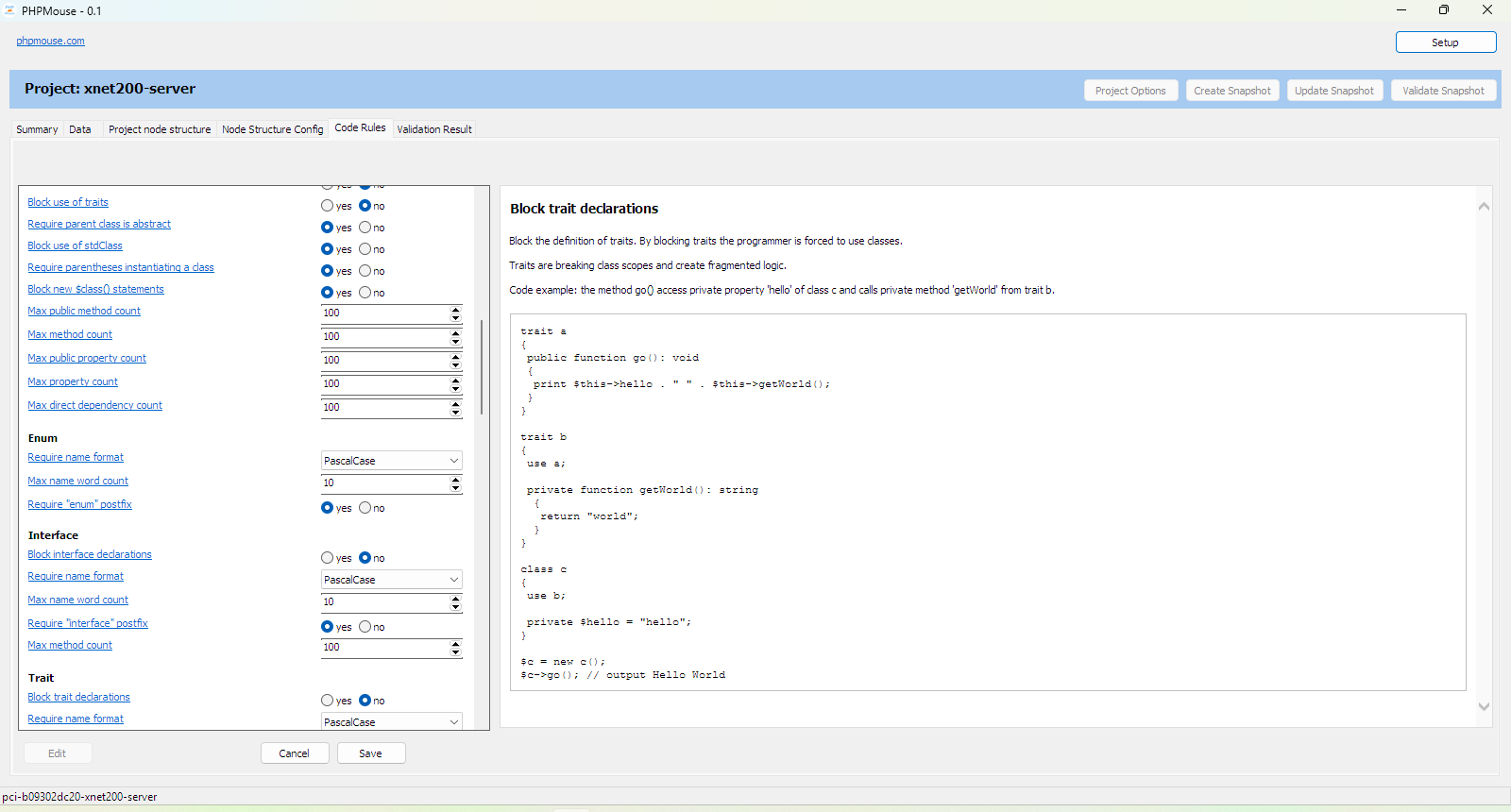
Rule types
There are three rule types:
- Require a writing style or construct.
- Block a specific statement or construct.
- Setting a maximum for quantitative data.
Rule usage
A number of rules are almost always recommended.
However, there are also many arbitrary rules that make one wonder why they might be useful, for example: "Block throw exception".
These can be used when refactoring code where programmers have made unnecessary or incorrect use of a specific construct.
By blocking this construct, an overview can be shown of where it has been used.
After refactoring, a rule can also be turned off again; not all detected "errors" are actually errors.
All available rules
| Description | |
|---|---|
| File | |
| Require name format | |
|
Require that the established formatting of a name is adhered to. Formatting options:
| |
| Require "declare(strict_types=1)" | |
|
This rule requires the declare(strict_types = 1) statement at the beginning of a PHP
file. Function results and arguments can have type declarations. Without declare(strict_types = 1) PHP tries to convert a given value of another type to a value that matches the defined type. Code example: a functioncall with four times input thats not an integer. Without declare(strict_types = 1) this function returns 4.
With <i>declare(strict_types = 1)</i> it throws an exception.<br>
function AddInt(int $a, int $b, int $c, int $d) : int
{
 return $a + $b + $c + $d;
}

print AddInt(1.1, '1.1', '1.x', true);
<a href="test">test</a> |
|
| Require file name and type name check | |
|
The type declarations in the file should be equal or based on the name of the PHP
file. There are tree options:
Code example: one type per file in file with filename EntityValidator.php
class EntityValidator {
 ..
}
Code example: multiple types using prefix in file with filename EntityValidator.php
class EntityValidatorConfig {
 ..
}

class EntityValidatorInput {
 ..
}

class EntityValidatorResult {
 ..
}

class EntityValidator {
   public function __construct(EntityValidatorConfig $config) {

   }

   public function execute(EntityValidatorInput $input): EntityValidatorResult {

   }
}
|
|
| Block PHP close tag - ?> | |
| Omitting the closing tag '?>' helps you prevent accidental whitespace or newlines from being added to the end of the file. | |
| Block functions declarations | |
|
Block the declaration of functions, instead use classes that have only a single task and have a
single public method defined (in addition to the standard methods present, of course).
Code error example.
$pdf = ConvertXmlToPdfDocument($xml, $options);
Code fix example.
$xmlToPdfDocumentConvertor = new XmlToPdfDocumentConvertor($options); $pdf = $xmlToPdfDocumentConvertor->execute($xml); | |
| Block anonymous function | |
|
Block the use of anonymous functions. Anonymous functions are quickly harder to read. Replace the code that uses them with a class construct in which the anonymous function is replaced by a private method.
Function with anonymous function.
function dash_to_upper(string $s): string
{
    return preg_replace_callback('~-([a-z])~', function ($match) {
        return strtoupper($match[1]);
    }, $s);
}
Rewritten without anonymous function.
class dash_to_upper_convertor
{
    public function execute(string $s): string
    {
        return preg_replace_callback('~-([a-z])~', [$this, 'replace'], $s);
    }

    private function replace($match): string
    {
        return strtoupper($match[1]);
    }
}

function dash_to_upper(string $s): string
{
    $dash_to_upper_convertor = new dash_to_upper_convertor();
    return $dash_to_upper_convertor->execute($s);
}
| |
| Require keywords in short form | |
| Require "int" instead of "integer" and "bool" instead of "boolean". | |
| Namespace | |
| Require name format | |
|
Require that the established formatting of a name is adhered to. Formatting options:
| |
| Block namespace declarations | |
|
Block the definition of a namespace, but not the use of code that is itself defined in a
namespace. If correct naming rules are followed, name conflicts within a (global) space cannot occur. The disadvantage of namespaces is the many extra lines of code that do nothing other than refer to types. Open Source frameworks use (sub-)namespaces (in notation a sub-namespace but in reality a standalone namespace) to find and load types in the application file structure. This has the disadvantage that a lot of namespaces are created that are linked to a file structure, which means that restructuring code requires much more work. Furthermore, the names that arise are indeed more of a path than a descriptive space name. (Code structure is not the same as file structure.) | |
| Max segment count | |
|
Max segment count limits the number of namespace segments divided by slashes.
Code error example: max segments is set to "1" in config.
namespace Domain\Entity\Article;
Code fix example.
namespace Domain; | |
| Constant | |
| Require name format | |
|
Require that the established formatting of a name is adhered to. Formatting options:
| |
| Require class const visibility declaration | |
|
Require the visibility keyword: private, protected or public.
Code error example: const and method have no visibility declaration and property is declared
with the var keyword.
class Session
{
    const expires = 3600;

    var array $params = [];

    function setParam(string $name, string $value): void
    {
     // ..
    }
}
Code fix example.
class Session
{
    private const expires = 3600;

    private array $params = [];

    public function setParam(string $name, string $value): void
    {
     // ..
    }
}
| |
| Var | |
| Require name format | |
|
Require that the established formatting of a name is adhered to. Formatting options:
| |
| Require object var naming based on class | |
|
The name of variables with a class type should be based on the class name. Name should be: 1 - equal to the class name or, 2 - the class name should be used as postfix or, 3 - consist of word combinations that are also found in the class name and where the last word is the same as the last word of the class name. Remark 1: when the type is an enum and the name has the postfix Enum, the postfix is removed before validating the name. Remark 2: for variable "$result" these rules do not apply. Code example: borderColor is here a valid name: the name has the postfix "Color" and is equal to type name minus "Enum". public function DrawBorder(ColorEnum $borderColor): void
{
}
Code example: class initialization, one occurrence in scope, name equal to type.
$rssReader = new RssReader();
Code example: the exception to the rules, result var "$result".
public function CreateRssReader(): RssReader
{
  $result = new RssReader();
  return $result;
}
Code example: initialization of multiple objects. Type is used as postfix.
$sourceDirectory = new Directory();
$targetDirectory = new Directory();
Code example: initialization of multiple objects. One equal to type, the other has the type
as postfix.
$treeNode = new TreeNode();
$childTreeNode = new TreeNode();
Code example: one argument, name equal to type.
public function GetOrdersByDate(Date $date): OrderList
{
 ..
}
Code example: Two arguments with the same type. Type is used as postfix.
public function getDayCountBetweenDates(Date $fromDate, Date $toDate): integer
{
 ..
}
Code example: $query is last word of type name.
class UserRepository
{
    public function selectByQuery(UserQuery $query): UserList
    {
     // ..
    }
}
Code example: $config is last word of type name.
$config = new AppConfig();
Code example: $databaseConfig is last two words of type name.
$databaseConfig = new SqlDatabaseConfig(); | |
| Block use of globals | |
Block use of the global vars:
Global variables break the scope of functions and methods.
Code example: passing the global vars to a HttpRequest object.
class HttpRequestData
{
    public string $uri;

    public array $post = [];

    public array $get = [];

    public array $files = [];

    // ..
}

class HttpRequest
{
    public readonly HttpRequestUrl $url;

    public readonly HttpRequestParamList $paramList;

    public readonly HttpRequestFileList $fileList;

    // ..

    public function __construct(HttpRequestData $httpRequestData)
    {
        // ..
    }

}

// use the globals outside a function.
$data = new HttpRequestData();
$data->uri = getenv("REQUEST_URI");
$data->post = $_POST;
$data->get = $_GET;
$data->files = $_FILES;

$httpRequest = new HttpRequest($data);

$app = new App();
$app->run($httpRequest);
| |
| Block multi dimensional array | |
|
By blocking multidimensional arrays the programmer is forced to create a class
structure.
Code error example: application config as array.
$appConfig = [];

$appConfig["database"] = [];
$appConfig["database"]["dev"] = [];
$appConfig["database"]["dev"]["host"] = "localhost";
$appConfig["database"]["dev"]["name"] = "db1";
$appConfig["database"]["dev"]["user"] = "admin";

$appConfig["database"]["prod"] = [];
..
Code fix example: define config as a class structure, example with "env" on item
level.
$appConfig = new AppConfig();

$dbConfig = $appConfig->database->add("prod");
$dbConfig->host = "localhost";
$dbConfig->name = "db1";
$dbConfig->user = "admin";
..
$dbConfig = $appConfig->database->get("prod");

$database = new Database($dbConfig);
Code fix example: define config as a class structure, example with "env" on config
level.
$envConfig = $appConfig->addEnvConfig("prod");

$envConfig->database->host = "localhost";
$envConfig->database->name = "db1";
$envConfig->database->user = "admin";
..
$envConfig = $appConfig->getEnvConfig("prod");
$dbConfig = $envConfig->database;

$database = new Database($dbConfig);
| |
| Class | |
| Require name format | |
|
Require that the established formatting of a name is adhered to. Formatting options:
| |
| Require "abstract" prefix when abstract | |
|
Use the word "abstract" as a prefix in the class name when class is abstract.
Code example.
abstract class AbstractController
{
 ..
}
| |
| Block anonymous class | |
|
Block the usage of anonymous classes.
Code error example: anonymous class.
$util->setLogger(new class {
    public function log($msg)
    {
        echo $msg;
    }
});
Code fix example: refactor as a class.
class Logger
{
    public function log($msg)
    {
        echo $msg;
    }
}

$util->setLogger(new Logger());
| |
| Block use of constantes in class | |
| Move the class constantes to an enum. | |
| Block use of interfaces | |
| Blocking interface usage simplifies the codebase. The alternative is to use abstract classes with abstract methods. | |
| Block use of traits | |
|
Block the usage of traits. By blocking traits the programmer is forced to use classes. Traits are breaking class scopes and create fragmented logic. Code example: the method go() access private property 'hello' of class c and calls private method 'getWorld' from trait b. trait a
{
public function go(): void
{
print $this->hello . " " . $this->getWorld();
}
}
trait b
{
use a;
private function getWorld(): string
{
return "world";
}
}
class c
{
use b;
private $hello = "hello";
}
$c = new c();
$c->go(); // output Hello World
| |
| Require parent class is abstract | |
|
A class can extend from a concrete or an abstract class. When using this rule only abstract classes can be used to extend a class. If concrete classes can be extended there is less need to think about the class structure. New logic? just extends a class and add or override logic. But this leads to random dependencies that makes code harder to modify. An abstract class is created to be extended by other classes so the design is focused on extending. |
|
| Block use of stdClass | |
|
The stdClass is an anonymous data structure. Blocking the stdClass forces the programmer to use a class type. Of course it can be replaced by an array what also is an anonymous data structure.
The optimal solution is to replace it with a real class.<br>
class SendMessageService
{
    public function execute():
    {
        $result = new stdClass();
        $result->success = false;
        $result->errorMsg = "";

        return $result;
    }
}

class send_message
 {

  /**
   *
   * @return method_result
   */
  function execute(message_out $message_out, $is_test = false)
   {
    $result = new method_result();

    if ($message_out->status->get_value() != "outbox")
     {
      //trigger_error("message_out moet status 'outbox' hebben");
      //return;
     }

    if ($message_out->email->is_empty())
     {
      $result->set_error("geen emailadress gevonden");
     }
| |
| Require parentheses instantiating a class | |
|
Code error example:
$rssReader = new RssReader;
Code fix example: add () to the statement.
$rssReader = new RssReader(); | |
| Block new $class() statements | |
|
The $object = new $class() statement create an object based on the value of the variable. The construction can create compacter code but the object from there is unknown in the IDE. No object hinting or click-jump to class.
Code error example.
class Application
{
  public function GetController(string $routeName) : Controller
  {
   $controllerName = $routeName."Controller";
   $result = new $controllerName();
   return $result;
  }
}
Code fix example.
class Application
{
    public function GetController(string $routeName): ?Controller
    {
        $result = null;

        if ($routeName == "home") {
            $result = new HomeController();
        } else if ($routeName == "login") {
            $result = new LoginController();
        }

        return $result;
    }
}
| |
| Max public method count | |
| The maximum number of public methods a class / interface / trait / enum can contain. | |
| Max method count | |
| The maximum number of methods a class / interface / trait / enum can contain. | |
| Max public property count | |
| The maximum number of public properties a class / interface / trait / enum can contain. | |
| Max property count | |
| The maximum number of properties a class / interface / trait / enum can contain. | |
| Max direct dependency count | |
The class dependencies are:
| |
| Enum | |
| Require name format | |
|
Require that the established formatting of a name is adhered to. Formatting options:
| |
| Require "enum" postfix | |
|
When using this rule: the type name must have the type as a postfix.
Code example interface.
interface ControllerInterface
{

}
Code example enum.
enum SortDirectionEnum
{
    case Asc;
    case Desc;
}
Code example trait.
trait StorageTrait
{

}
| |
| Interface | |
| Require name format | |
|
Require that the established formatting of a name is adhered to. Formatting options:
| |
| Block interface declarations | |
|
Object interfaces allow you to create code which specifies which methods a class must implement,
without having to define how these methods are implemented. But in most cases interface usage is not necessary. It's just extra code that needs to be maintained. |
|
| Require "interface" postfix | |
|
When using this rule: the type name must have the type as a postfix.
Code example interface.
interface ControllerInterface
{

}
Code example enum.
enum SortDirectionEnum
{
    case Asc;
    case Desc;
}
Code example trait.
trait StorageTrait
{

}
| |
| Max method count | |
| The maximum number of methods a class / interface / trait / enum can contain. | |
| Trait | |
| Require name format | |
|
Require that the established formatting of a name is adhered to. Formatting options:
| |
| Block trait declarations | |
|
Block the definition of traits. By blocking traits the programmer is forced to use classes. Traits are breaking class scopes and create fragmented logic. Code example: the method go() access private property 'hello' of class c and calls private method 'getWorld' from trait b. trait a
{
public function go(): void
{
print $this->hello . " " . $this->getWorld();
}
}
trait b
{
use a;
private function getWorld(): string
{
return "world";
}
}
class c
{
use b;
private $hello = "hello";
}
$c = new c();
$c->go(); // output Hello World
| |
| Require "trait" postfix | |
|
When using this rule: the type name must have the type as a postfix.
Code example interface.
interface ControllerInterface
{

}
Code example enum.
enum SortDirectionEnum
{
    case Asc;
    case Desc;
}
Code example trait.
trait StorageTrait
{

}
| |
| Block use of other traits in trait | |
|
Block the usage of traits. By blocking traits the programmer is forced to use classes. Traits are breaking class scopes and create fragmented logic. Code example: the method go() access private property 'hello' of class c and calls private method 'getWorld' from trait b. trait a
{
public function go(): void
{
print $this->hello . " " . $this->getWorld();
}
}
trait b
{
use a;
private function getWorld(): string
{
return "world";
}
}
class c
{
use b;
private $hello = "hello";
}
$c = new c();
$c->go(); // output Hello World
| |
| Max method count | |
| The maximum number of methods a class / interface / trait / enum can contain. | |
| Max property count | |
| The maximum number of properties a class / interface / trait / enum can contain. | |
| Max direct dependency count | |
The class dependencies are:
| |
| Method | |
| Require name format | |
|
Require that the established formatting of a name is adhered to. Formatting options:
| |
| Require visibility declaration | |
|
Require the visibility keyword: private, protected or public.
Code error example: const and method have no visibility declaration and property is declared
with the var keyword.
class Session
{
    const expires = 3600;

    var array $params = [];

    function setParam(string $name, string $value): void
    {
     // ..
    }
}
Code fix example.
class Session
{
    private const expires = 3600;

    private array $params = [];

    public function setParam(string $name, string $value): void
    {
     // ..
    }
}
| |
| Block property get and set methods | |
|
Blocking using getter and setter functions on a class to access private or protected properties. Using getter and setter functions is just (a lot of) extra code where public properties should be used instead. The only argument could be that a setter function can validate the value, but the validation of property values should not take place in the same class. It's a different task.
Code example: instead using get methods, use readonly public properties introduced in PHP8.
class HttpRequest
{
 public readonly string $method;

 public readonly string $userAgent;

 public function __construct(array $data)
 {
  $this->method = $this->getValue($data, 'method');
  $this->userAgent = $this->getValue($data, 'user-agent');
 }
}

$httpRequest = new HttpRequest($_SERVER);
| |
| Block static methods | |
|
Blocking static methods forces the programmer to use class instances and instance methods. In most cases static methods are not needed and should be replaced with instance methods. Remove helper classes refactor them to a value object or seperate task classes.
<br>
class ImageHelper
{
 public static function rotate(Image $image)
 {
  ..
 }
}
Refactor to a value object.
class Picture
{
 public function __construct(Image $image)
 {
  $this->image = $image;
 }

 public function rotate()
 {
  ..
 }
}
Refactor to seperate task classes.
class ImageRotator
{
 public function execute(Image $image)
 {
  ..
 }
}
Remove static factory methods.
Remove static getSingleton methods. |
|
| Block magic __get | |
|
Block the declaration of the magic "__get" method. __get() is triggered when reading data from inaccessible (protected or private) or non-existing properties. The problem with magic methods is that the logic that is executed is no longer directly readable in the code. There is an application for this method, namely for lazy-loading properties that have an object as a value.
Example code.
class Domain
{
    public ArticleRepository $article;
    public UserRepository $user;

    public function __construct()
    {
        unset($this->article);
        unset($this->user);
    }

    public function __get($name)
    {
        if (isset($this->$name) == false) {
            if ($name == "article") {
                $this->$name = new ArticleRepository();
            } else if ($name == "user") {
                $this->$name = new UserRepository();
            }
        }
        $result = $this->$name;
        return $result;
    }
}

$articleId = 1;
$domain = new Domain();
$article = $domain->article->loadById($articleId);
| |
| Block magic __set | |
| No detailed description available. | |
| Block magic __call | |
|
Block the declaration of the magic "__call" method. __call() is triggered when invoking inaccessible methods in an object context. The problem with magic methods is that the logic that is executed is no longer directly readable in the code. It is difficult to find a practical application for __call. |
|
| Block magic __isset | |
|
Block the declaration of the magic "__isset" method. The __invoke() method is called when a script tries to call an object as a function. The problem with magic methods is that the logic that is executed is no longer directly readable in the code. It is difficult to find a practical application for __isset. |
|
| Block magic __unset | |
| No detailed description available. | |
| Block magic __invoke | |
|
Block the declaration of the magic "__invoke" method. The __invoke() method is called when a script tries to call an object as a function. The problem with magic methods is that the logic that is executed is no longer directly readable in the code. It is difficult to find a practical application for __invoke. In addition, this method produces a confusing statement in the code, a variable is called as a function. This looks like a bug. |
|
| Block magic __callStatic | |
|
Block the declaration of the magic "__callStatic" method. __callStatic is triggered when invoking inaccessible methods in a static context. The problem with magic methods is that the logic that is executed is no longer directly readable in the code. It is difficult to find a practical application for __callStatic. |
|
| Max var count | |
| A function or method can be assessed quantitatively by accepting a maximum number of local variables. | |
| Max nesting depth | |
| Max nesting depth | |
| Max token count | |
| Code can be assessed quantitatively by accepting a maximum number of tokens. Tabs, line breaks, spaces, empty lines, doc comments and inline comments are not counted. So this metric gives a better picture than the number of lines. | |
| Max line count | |
| The maximum number of lines of code. | |
| Function call | |
| Block method chaining | |
|
Method chaining makes code more compact but makes debugging much harder when stepping through
code.
Code error example
$config->add('Option 1')->add('Option 2')->add('Option 3');
Code fix example
$config->add('Option 1');
$config->add('Option 2')
$config->add('Option 3');
| |
| Block null save operator a()?->b; | |
|
When method chaining is used, the null-save operator is a compact way to catch null values. However, it is less readable and harder to debug.
Code error example (is address null or country null?).
$country = $customer->getAddress()?->getCountry();
Code fix example.
$address = $customer->getAddress();
if ($address) {
    $country = $address->getCountry();
    ...
}
| |
| Block use of regexp functions | |
|
Regular expressions are powerfull tools but are also hard to read and debug. By blocking them default en only accept them in specific classes the programmer is forced to wrap them in classes instead of direct in code where the regexp results are used.
Code error example.
class WebCrawler
{
    public function execute(string $url): void
    {
        $this->handleDocument($url);
    }

    private function handleDocument(string $url): void
    {
        $text = $this->getText($url);

        $r = preg_match_all('/<img(.*)src(.*)=(.*)"(.*)"(.*)>/U', $text, $matches);
        if ($r) {
            foreach ($matches[4] as $url) {
                $this->handleImage($url);
            }
        }

        $r = preg_match_all('/<a(.*)href(.*)=(.*)"(.*)"(.*)>/U', $text, $matches);
        if ($r) {
            foreach ($matches[4] as $url) {
                $this->handleDocument($url);
            }
        }
    }

    ..
}
Code fix example: regexp moves to another class.
class WebCrawler
{
    public function execute(string $url): void
    {
        $this->handleDocument($url);
    }

    private function handleDocument(string $url): void
    {
        $text = $this->getText($url);

        $textDocument = new TextDocument($text);

        foreach ($textDocument->getImageUrls() as $url) {
            $this->handleImage($url);
        }

        foreach ($textDocument->getLinkUrls() as $url) {
            $this->handleDocument($url);
        }
    }

    ..
}
Code fix example: the TextDocument class with the regexp.
<i>The class file will have to be linked to a new validation config to be created in
which a regexp is allowed.</i>
class TextDocument
{
    private string $text;

    public function __construct(string $text)
    {
        $this->text = $text;
    }

    function getLinkUrls(): array
    {
        $result = [];

        $r = preg_match_all('/<a(.*)href(.*)=(.*)"(.*)"(.*)>/U', $this->text, $matches);
        if ($r) {
            $result = $matches[4];
        }

        return $result;
    }

    function getImageUrls(): array
    {
        $result = [];

        $r = preg_match_all('/<img(.*)src(.*)=(.*)"(.*)"(.*)>/U', $this->text, $matches);
        if ($r) {
            $result = $matches[4];
        }

        return $result;
    }
}
| |
| Block anonymous function as argument | |
|
A anonymous function as argument is less readable (and also can't be tested).
Code error example: anonymous function as argument.
register_shutdown_function(function () {
    print "Shutdown";
});
Code fix example: refactor as a function.
function shutdown()
{
    print "Shutdown";
}

register_shutdown_function("shutdown");
Code fix example: refactor as a static method.
class EventHandlers
{
    public static function shutdown()
    {
        print "Shutdown EventHandlers";
    }
}

register_shutdown_function(array('EventHandlers', 'shutdown'));
Code fix example: refactor as a method.
class App
{
    public function __construct()
    {
        register_shutdown_function(array($this, 'shutdown'));
    }

    private function shutdown()
    {
        print "Shutdown App";
    }
}
| |
| Block function call as argument | |
|
A function call within a function call makes the statement more complex to read and debug. When debugging, the argument value is only visible when the first line of the called function is active.
Code error example.
$z = z(y(x($p)));
Code fix example.
$x = x($p); $y = y($x); $z = z($y); | |
| Function argument | |
| Require name format | |
|
Require that the established formatting of a name is adhered to. Formatting options:
| |
| Require argument naming based on class | |
|
The name of variables with a class type should be based on the class name. Name should be: 1 - equal to the class name or, 2 - the class name should be used as postfix or, 3 - consist of word combinations that are also found in the class name and where the last word is the same as the last word of the class name. Remark 1: when the type is an enum and the name has the postfix Enum, the postfix is removed before validating the name. Remark 2: for variable "$result" these rules do not apply. Code example: borderColor is here a valid name: the name has the postfix "Color" and is equal to type name minus "Enum". public function DrawBorder(ColorEnum $borderColor): void
{
}
Code example: class initialization, one occurrence in scope, name equal to type.
$rssReader = new RssReader();
Code example: the exception to the rules, result var "$result".
public function CreateRssReader(): RssReader
{
  $result = new RssReader();
  return $result;
}
Code example: initialization of multiple objects. Type is used as postfix.
$sourceDirectory = new Directory();
$targetDirectory = new Directory();
Code example: initialization of multiple objects. One equal to type, the other has the type
as postfix.
$treeNode = new TreeNode();
$childTreeNode = new TreeNode();
Code example: one argument, name equal to type.
public function GetOrdersByDate(Date $date): OrderList
{
 ..
}
Code example: Two arguments with the same type. Type is used as postfix.
public function getDayCountBetweenDates(Date $fromDate, Date $toDate): integer
{
 ..
}
Code example: $query is last word of type name.
class UserRepository
{
    public function selectByQuery(UserQuery $query): UserList
    {
     // ..
    }
}
Code example: $config is last word of type name.
$config = new AppConfig();
Code example: $databaseConfig is last two words of type name.
$databaseConfig = new SqlDatabaseConfig(); | |
| Require argument type declaration in code | |
|
By using argument type declaration in code the values passed to the function are checked against the
defined type. For scalar types <a href="file-require_declare_strict_types">declare(strict_types = 1)</a> statement at the beginning of a PHP file is also needed.
From code without argument declarations.<br>
class ProductRepository
{
    /**
     * @param Category $category
     * @param int $pageNr
     * @param int $count
     * @param string $sortByFieldName
     * @param SortDirectionEnum $sortDirection
     * @return ProductList
     */
    function selectByCategory($category, $pageNr, $count, $sortByFieldName, $sortDirection): ProductList
    {
        //..
    }
}
To argument declarations
class ProductRepository
{
    function selectByCategory(Category $category, int $pageNr, int $count, string $sortByFieldName, SortDirectionEnum $sortDirection): ProductList
    {
        //..
    }
}
| |
| Block doccomment argument type declarations | |
|
Block the definition of (redundant) doc comment @param declarations.
Code error example.
/**
     * @param query $query
     * @return query_result
     */
    public function execute(query $query): query_result
    {
        //...
    }
Code fix example.
public function execute(query $query): query_result
    {
        //...
    }
| |
| Block anonymous argument types for public method | |
|
By blocking generic types array, object, mixed and iterable the argument is forced to have a class
or enum as argument type. This serves as a contract with other code, provide information and the editor can use code completion.
Code error example: array argument type.<br>
class OrderLinesPriceCalculator
{
    /**
     * @param OrderLine[] $orderLines
     */
    public function execute(array $orderLines): float
    {
        $result = 0;

        foreach ($orderLines as $orderLine) {
            $result += $this->getOrderLinePrice($orderLine);
        }

        return $result;
    }
}
Code fix:
class OrderLinesPriceCalculator
{
    public function execute(OrderLineList $orderLineList): float
    {
        $result = 0;

        for ($i = 0; $i < $orderLineList->count(); $i++) {
            $orderLine = $orderLineList->get($i);
            $result += $this->getOrderLinePrice($orderLine);
        }

        return $result;
    }
}

class OrderLineList
{
    private array $items = [];

    public function add(OrderLine $orderLine): void
    {
        $this->items[] = $orderLine;
    }

    public function count(): int
    {
        $result = count($this->items);
        return $result;
    }

    public function get(int $index): ?OrderLine
    {
        $result = null;
        if (($index >= 0) and ($index < $this->count())) {
            $result = $this->items[$index];
        }
        return $result;
    }
}
| |
| Max argument count | |
|
Maximum number of arguments a function / method can contain.
Code error example: max arguments is set to 3.
class Canvas
{
    public function addImage(string $fileName,
                             int $left,
                             int $top,
                             int $width,
                             int $height,
                             bool $useGrayScale,
                             int $borderWidth,
                             CanvasColorEnum $borderColor ): void
    {
      ..
    }
}

$canvas = new Canvas();
$canvas->addImage(left: 10, top: 20, height: 100, width: 200, useGrayScale: true, fileName: '/images/logo.jpg', borderWidth:  1, borderColor: CanvasColorEnum::blue);
Code fix example: make an input class structure.
class CanvasBorder
{
    public int $width;
    public CanvasColorEnum $color;
}

class CanvasImage
{
    public readonly string $fileName;
    public int $width = 0;
    public int $height = 0;
    public bool $useGrayScale = false;
    public readonly CanvasBorder $border;

    public function __construct(string $fileName)
    {
        $this->fileName = $fileName;
        $this->border = new CanvasBorder();
    }
}

class Canvas
{
    public function addImage(CanvasImage $canvasImage, int $left, int $top): void
    {
    }
}

$canvas = new Canvas();

$canvasImage = new CanvasImage('/images/logo.jpg');
$canvasImage->height = 100;
$canvasImage->width = 200;
$canvasImage->useGrayScale = true;
$canvasImage->border->width = 2;
$canvasImage->border->color = CanvasColorEnum::blue;

$canvas->addImage($canvasImage, 10, 20);
| |
| Function result | |
| Require function result type declaration | |
|
A function or method must have a result type defined.
Code error example.
class ArticleRepository
{
    public function delete(Article $article)
    {
        // ..
    }

    public function save(Article $article)
    {
        //..
    }

    public function selectOneByQuery(ArticleQuery $query)
    {
        //..
    }

    public function selectByQuery(ArticleQuery $query)
    {
        //..
    }
}
Code fix example.
class ArticleRepository
{
    public function delete(Article $article): DeleteActionResult
    {
        // ..
    }

    public function save(Article $article): SaveActionResult
    {
        //..
    }

    public function selectOneByQuery(ArticleQuery $query): ?Article
    {
        //..
    }

    public function selectByQuery(ArticleQuery $query): ArticleList
    {
        //..
    }
}
| |
| Block doccomment result type declarations | |
|
Block the definition of (redundant) doc comment @return declarations.
Code error example.
class UserRepository
{
    /**
     * @return UserList
     */
    public function selectByQuery(UserQuery $query): UserList
    {
        //..
    }
}
Code fix example.
class UserRepository
{
    public function selectByQuery(UserQuery $query): UserList
    {
        //..
    }
}
| |
| Require $result as only name for return variabele | |
|
Require $result as only name for a return variabele.
Code error example.
function getHtml(): string {
  $html = '<html><body>Test 123</body></html>';

  return $html;
}
Code fix example.
function getHtml(): string {
  $result = '<html><body>Test 123</body></html>';

  return $result;
}
| |
| Block expression as return statement | |
| Block expression as return statement. | |
| Block anonymous result types for public method | |
|
By blocking general types as method results, specific result types must be used. In this way, there
is a contract between the different classes, and it is immediately clear which data is being passed.
Code error example: anonymous type.
public function getDataBase(): ?object
public function getPerson(): ?stdClass
public function getConfig(): array
Code fix example: refactor as a class.
public function getDataBase(): ?DataBase public function getPerson(): ?Person public function getConfig(): Config | |
| Property | |
| Require name format | |
|
Require that the established formatting of a name is adhered to. Formatting options:
| |
| Require property type declaration | |
|
By using argument type declaration in code the values passed to the function are checked against the
defined type. For scalar types <a href="file-require_declare_strict_types">declare(strict_types = 1)</a> statement at the beginning of a PHP file is also needed.
From code without argument declarations.<br>
class ProductRepository
{
    /**
     * @param Category $category
     * @param int $pageNr
     * @param int $count
     * @param string $sortByFieldName
     * @param SortDirectionEnum $sortDirection
     * @return ProductList
     */
    function selectByCategory($category, $pageNr, $count, $sortByFieldName, $sortDirection): ProductList
    {
        //..
    }
}
To argument declarations
class ProductRepository
{
    function selectByCategory(Category $category, int $pageNr, int $count, string $sortByFieldName, SortDirectionEnum $sortDirection): ProductList
    {
        //..
    }
}
| |
| Block promoted properties | |
|
Constructor property promotion will create a bit compacter code but the construction deviates from
what is common. A programmer expects the properties to be the first thing in a class. Also, not all properties can be defined in this way (those that do not get a value from outside). Finally, a doccomment addition is not possible here.
Code error example:
class Person
{
    function __construct(public string $firstName, public string $inFix, public string $lastName)
    {
    }
}
Code fix example: classic setup
class Person
{
    public string $firstName;
    public string $inFix;
    public string $lastName;

    function __construct(string $firstName, string $inFix, string $lastName)
    {
        $this->fistName = $fistName;
        $this->inFix = $inFix;
        $this->lastName = $lastName;
    }
}
Code fix example: classic setup with compacter code by setting properties via method.
class Person extends AbstractObject
{
    public string $firstName;
    public string $inFix;
    public string $lastName;

    function __construct(string $firstName, string $inFix, string $lastName)
    {
        $this->assignPropertyValues(func_get_args()); // set properties in one line of code
    }
}

class AbstractObject
{
    protected function assignPropertyValues(array $values): void
    {
        $reflectionClass = new ReflectionClass($this);
        $reflectionMethod = $reflectionClass->getMethod("__construct");

        $n = 0;
        foreach ($reflectionMethod->getParameters() as $parameter) {
            $parameterName = $parameter->name;

            if ($reflectionClass->hasProperty($parameterName)) {
                $this->$parameterName = $values[$n];
                $n++;
            }
        }
    }
}
| |
| Block doccomment property type declaration | |
|
Block the definition of (redundant) doc comment @param declarations.
Code error example.
/**
     * @param query $query
     * @return query_result
     */
    public function execute(query $query): query_result
    {
        //...
    }
Code fix example.
public function execute(query $query): query_result
    {
        //...
    }
| |
| Block anonymous type for property | |
|
By blocking general types as property type, specific property types must be used.
Code error example: anonymous type.
public ?object dataBase;
public ?stdClass person;
public array config;
Code fix example: refactor as a class.
public ?DataBase dataBase; public ?Person person; public Config config; | |
| Block static properties | |
|
Static properties have the same problems as global variables, they break the scope of methods and
functions.
Code error example.
class AppData
{
    private static Database $database;

    public static Session $session;

    public static function setDatabase(Database $database)
    {
        self::$database = $database;
    }

    public static function getDatabase(): Database
    {
        return self::$database;
    }
}

class UserLoginController
{
    public function execute(string $username, string $password): HttpResponse
    {
        $database = AppData::getDatabase(); // global data via method
        // ..
        AppData::$session->setParam("user_id", $userId); // global data via property

        return $result;
    }
}
Code error example: protected and private static properties accessible via a method.
Code error example: singleton.
| |
| Block var property declaration | |
|
Var is an obsolete way of declaring class properties.
Code error example.
class Circle {
 var $radius = 100;
}
Code fix example:
class Circle {
 public int $radius = 100;
}
| |
| String | |
| Block multiline string | |
|
Code error example.
$text = '
Lorem ipsum dolor sit amet, consectetur adipiscing elit.
Quisque eu turpis quis erat varius sodales aliquam eget enim.
Fusce semper blandit lorem, sed laoreet sapien tempus non.
';
Code fix example.
$text = 'Lorem ipsum dolor sit amet, consectetur adipiscing elit.';
$text .= 'Quisque eu turpis quis erat varius sodales aliquam eget enim.';
$text .= 'Fusce semper blandit lorem, sed laoreet sapien tempus non.';
Code fix example.
$stringList = new StringList();
$stringList->add('Lorem ipsum dolor sit amet, consectetur adipiscing elit.');
$stringList->add('Quisque eu turpis quis erat varius sodales aliquam eget enim.');
$stringList->add('Fusce semper blandit lorem, sed laoreet sapien tempus non.');

$text = $stringList->__toString();
| |
| Block heredoc, nowdoc multiline string | |
|
Heredoc, nowdoc and multiline strings enable large blocks of text in code. When programming this is a fast way to copy paste text blocks in code, for example SQL. By blocking heredoc, nowdoc and multiline strings the programmer is forced to build the text. It can be as simple as adding line by line to a var or stringlist class method. But the preferred solution is to use a code construction that is specific for the text. For example instead of SQL text use a SQL builder, instead of XML text use a document class, ect.
Code error example: heredoc usage.
if ($useText) {
    $text = <<<TEXT
Lorem ipsum dolor sit amet, consectetur adipiscing elit.
Quisque eu turpis quis erat varius sodales aliquam eget enim.
Fusce semper blandit lorem, sed laoreet sapien tempus non.
TEXT;
}
Code fix example:
if ($useText) {
    $stringList = new StringList();
    $stringList->add("Lorem ipsum dolor sit amet, consectetur adipiscing elit.");
    $stringList->add("Quisque eu turpis quis erat varius sodales aliquam eget enim.");
    $stringList->add("Fusce semper blandit lorem, sed laoreet sapien tempus non.");
    $text = $stringList->__toString();
}
Code error example: multiline string.
$sql = "UPDATE article
           SET name = :name,
               price = :price
         WHERE id=:id";

$database->execSql($sql, ["name" => $article->name, "price" => $article->price]);
Code fix example.
$cmd = new DbUpdateByIdCmd("article", $article->id);
$cmd->setField("name", $article->name);
$cmd->setField("price", $article->price);

$database->execCmd($cmd);
| |
| Loop statement | |
| Require brackets | |
|
Code error example.
for ($i = 1; $i <= 10; $i++) print $i;
Code fix example.
for ($i = 1; $i <= 10; $i++) {
    print $i;
}
| |
| Max loop condition complexity | |
|
The complexity of a loop condition is determined here by the sum of: the number of numeric, string
and comparison operators and the number of function calls used.
Complexity = 0
foreach ($lines as $line) {}
Complexity 1 => 1x method call
foreach ($xml_block->get_blocks_by_tagname("record") as $record) {}
Complexity 2 => 2x method call
foreach ($this->app_data->domain->doc->rss_source->select->all()->get_items() as $rss_source) {}
Complexity 2 => 1x method call + 1x condition
while ($this->next_char() !== false) {
Complexity 3 => 1x assign + 1x condition + 1x increment
for ($i = 1; $i <= 12; $i++) {}
Complexity 4 => 1x assign + 1x condition + 1x function call + 1x increment
for($i = 0; $i < count($this->attachments); $i++){}
Complexity 5 => 1x assign + 1x "+" operator + 1x condition + 1x function call +
1x increment
for ($j = $i + 1; $j < count($lines); $j++) {}
| |
| If statement | |
| Require brackets | |
|
Code error example.
if ($a == 1) print "a is 1";
Code fix example.
if ($a == 1)
{
 print "a is 1";
}
| |
| Block assign in condition | |
|
Block an assignment statement in condition. Assign in condition makes a condition less readable and harder to debug. Another problem is when reading such conditions is questioning yourself is there a '=' missing?
Code error example.
if ($column = $this->getColumn($class, $property)) {
..
}
Code fixed.<br>
$column = $this->getColumn($class, $property);
if ($column) {
..
}
| |
| Block arithmetic operator in condition | |
|
Block the use of arithmetic operators in a condition. Arithmetic operators: + Addition
* Multiplication / Division % Modulus ** Exponentiation The condition becomes better to read and able to debug.
Code error example.
if ($stockProductCount - $orderedProductCount < MIN_PRODUCT_COUNT) {
 ..
}
Code fixed.
$productCount = $stockProductCount - $orderedProductCount;
if ($productCount < MIN_PRODUCT_COUNT) {
 ..
}
| |
| Block string operator in condition | |
|
Block the use of string operators in a condition. The condition becomes better to read and able to debug. Arithmetic operators: . Concatenation .= Concatenation assignment
Code error example.
if (file_exists($dirName.'/'.$fileName)) {
 ..
}
Code fix example.
$filePath = $dirName.'/'.$fileName;
if (file_exists($filePath)) {
 ..
}
| |
| Block ternary operator | |
| Block ternary operato | |
| Max if condition complexity | |
|
The complexity of an if condition is determined here by the sum of: the number of numeric, string
and comparison operators and the number of function calls used.
Complexity = 0
if ($project->is_active) {}
Complexity = 1 => 1x method call
if (is_object($pdf)) {}
Complexity = 3 => 1x function call + 1x method call + 1x comparison operator
if (count($domain_query->get_field_names()) > 0) {}
Complexity = 6 => 1x comparison operator + 5x method call
if (!$this->domain->get_access()->can_delete_entity(
            $this->domain->get_context_name(),
            $this->domain->get_user_type(),
            $entity::get_entity_name())
            ) {

            return $result->add_error(domain_action_result_error_type_enum::action_denied);
        }
| |
| Error handling | |
| Block throw exception | |
|
Block the "throw new Exception()" statement. When using throw exceptions for errors the other code need to use 'try catch' constructs. 'Try catch' constructs are more technical then descriptive and can create unnecessary complexity by breaking the logical flow. By blocking throwing of exceptions the programmer is forced to return the error by a function result. Exceptions should only be used for:
Note that a class can use exceptions but still can return the result as a value.
Code error example: save file using an Exception.
try {
  $system->saveToFile($fileName, $content);
catch (Exception $e) {
  print $e->getMessage();
}
Code fix example: return true or false as result.
if (!$system->saveToFile($fileName, $content)) {
  print "Error saving file.";
}
Code fix example: return result object.
$r = $system->saveToFile($fileName, $content);
if ($r->failed) {
  print $r->errorMsg;
}
| |
| Block extended exception | |
|
Code error example.
class NotFoundException extends Exception{

}

throw new NotFoundException($itemName);
Code fix example.
enum ErrorTypeEnum {
    case notfound;
}

throw new Exception($itemName, ErrorTypeEnum::notfound);
| |
| Block try catch | |
| 'Try catch' constructs are more technical than descriptive and can create unnecessary complexity by interrupting the logical flow. | |
| Block trigger_error | |
| Block trigger_error() for triggering an error. | |
| Other | |
| Block debug statements | |
|
Block the use of var_dump, print_r(), debug_zval_dump(), var_export() and __debugInfo(). This prevents data from being accidentally printed that may have been used during debugging. |
|
| Block print and echo statements | |
|
Block the use of print and echo statements. This prevents data from being accidentally printed that may have been used during debugging. |
|
| Block command execute statements | |
| Block the use of exec(), shell_exec(), passthru() and system proc_open(). | |